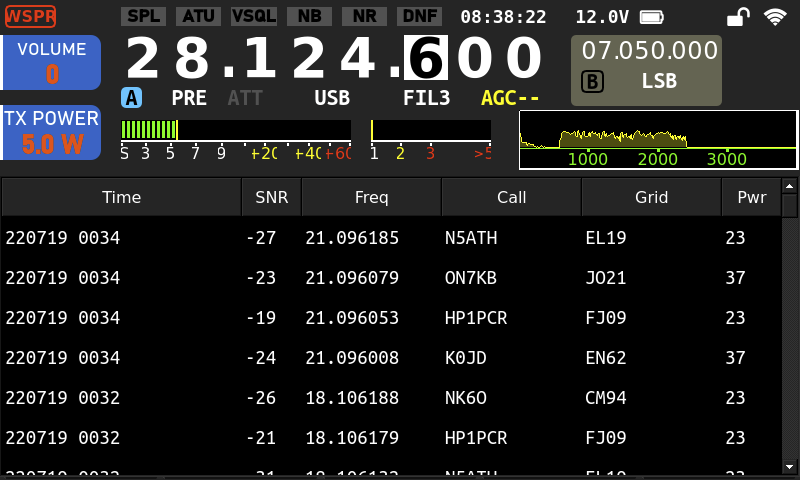
x6100-wspr
WSPR tools firmware for the Xiegu X6100
- Receive only (so far)
- Uploads spots to wsprnet.org when online
- Bonus userland improvements
Installation Overview
- Download the compressed SD card image.
- Decompress the compressed image. For example:
xz -d x6100-wspr-0.9.8.img.xz. - Write the decompressed image to disk. For example, if your SD card was
/dev/sdb:
$ sudo dd if=x6100-wspr-0.9.8.img of=/dev/sdb bs=4k
160768+0 records in
160768+0 records out
658505728 bytes (659 MB, 628 MiB) copied, 9.7834 s, 67.3 MB/s
Use
Boot the X6100 with that SD card in the CARD slot.
Configuration (optional, required wsprnet reporting, persists)
Steps 1-4 can be done on another device by mounting partition 2 of the SD card.
- Copy /root/spotter-loop.conf.template to /root/spotter-loop.conf.
- Update at least ‘CALL’ and ‘GRID’ in that file.
- Copy /etc/NetworkManager/system-connections/default.nmconnection.template to /etc/NetworkManager/system-connections/default.nmconnection.
- Set WiFi SSID and PSK in that file.
- If you did all that through the serial console, reboot.
- Once connected to wifi, sync time with
/etc/init.d/S48sntpd start.
Step 6 is only required if the system clock is wrong. The network is usually not up in time for that init script, so sntpd has to be started manually.
Root filesystem build
This will take over an hour and several dozen gigabytes of disk space.
wget https://buildroot.org/downloads/buildroot-2020.02.9.tar.gzgit clone https://github.com/sstjohn/x6100-wspr.gittar xf buildroot-2020.02.9.tar.gzmake -C buildroot-2020.02.9 O=../br2_build BR2_EXTERNAL=../x6100-wspr/br2_external x6100-wspr_defconfigcd br2_build; make -j$(nproc)- Produced image output to
br2_build/images/rootfs.tar.
Screenshot